
The fix, in short
Inspect connectors and count terminators. Inspect every connector for corrosion, bent pins, and full seating. Confirm there are exactly two terminators, one at each physical end of the backbone. Some displays and gateways have a built-in terminator, so check for those before counting.
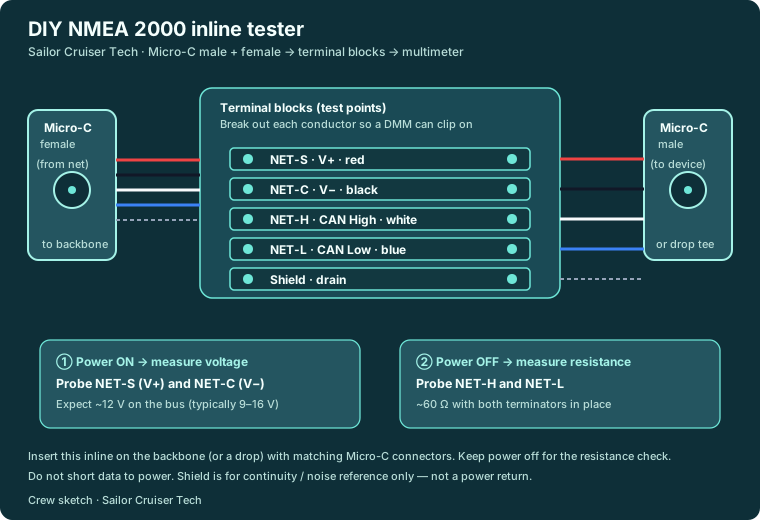
Power on: measure bus voltage at both ends. Power ON: measure between NET-S (V+, red) and NET-C (V-, black). Expect about 12 V, and anywhere from 9 to 16 V on a healthy bus. With all devices on, the far end of the backbone should still read at least 9 V.
Power off: measure terminator resistance. Power OFF: measure between NET-H (white) and NET-L (blue). About 60 ohms means both 120-ohm terminators are in place. About 120 ohms means one is missing; near 0 ohms or open means a short or a break.
Check cable lengths against the limits. Stay within cable limits: about 6 m maximum per drop cable, about 78 m of drop cable in total on Mid cable, and a backbone of up to 100 m on Mid cable or 200 m on Heavy cable.
Use an inline tester or a diagnostic tool. A simple DIY inline tester (male and female Micro-C connectors wired through terminal blocks) lets you clip the meter in without cutting the harness. To see traffic and device lists, use a dedicated tool such as a Maretron N2KMeter or a USB gateway like the Actisense NGT-1.
Written by Sailor Cruiser crew. General guidance, not an inspection of your boat.
Equipment involved
- NMEA 2000 backbone: Micro-C / DeviceNet cabling, any brand
- Test tools: Digital multimeter; optional Maretron N2KMeter or Actisense NGT-1
Related guides
- Guide: Plotter, radar, or autopilot drop offline together
- Guide: Electronics act haunted after heavy weather
- NMEA backbone faults: why several screens fail together
- All ten public guides
Members get the full step-by-step for their boat — join
This page is the short version. Members ask about their own boat and gear, get a guided fix matched to their equipment, and keep every case on file.